
Process Documentation: What It Is and How to Write It

Author: Kevin Baur BSc
Published on
Contents
While the same people do the same work every year, nobody notices that the process is not written down. It shows when someone is ill, resigns, or a new hire asks how something actually works. This guide explains what belongs in process documentation, how it differs from an SOP and a process map, and how to write it in seven steps. You will also find a complete example and a template to copy.
What is process documentation?
Asana describes process documentation as an internal, living document that sets out the steps, roles and resources needed to complete a business process from start to finish. The word "living" matters: the document has to change when the work changes. A process document captured once and never reviewed becomes misleading, which is worse than having none.
It usually serves three purposes: people carry out the work the same way, new employees get up to speed with less hand holding, and the team has something concrete to improve instead of arguing from memory.
Process documentation vs SOP vs process map
These three get mixed up all the time. They answer different questions and work best together:
| Document | Question | Scope | Format |
|---|---|---|---|
| Process documentation | What happens, who does it, in which order? | The whole workflow, often across roles | Text or table, usually with a diagram |
| SOP | Exactly how do I carry out this task? | One procedure, often one role | Numbered steps, version control |
| Process map | What does the flow look like at a glance? | A whole workflow or part of one | Shapes and arrows |
People draw the line differently, and some companies use "process document" and "SOP" for the same thing. A useful working rule: the process document gives the overview and links to SOPs for the detail. For those, see SOP examples and the free SOP template.
What to include: process documentation template
These fields cover most workflows in small and midsize companies. Copy the table into your editor or wiki:
| Field | Question to answer |
|---|---|
| Name and purpose | What is this process called and why does it exist? |
| Process owner | Which one role keeps it up to date? |
| Trigger and end point | What starts it, and how do you know it is finished? |
| Inputs | What must be available before it begins? |
| Output | What comes out, and who receives it? |
| Steps and roles | What happens in which order, and which role does it? |
| Decisions and exceptions | Where does the path split, and what if things go wrong? |
| Tools and storage | Which systems, forms and folders are needed? |
| Deadlines | What is due by when? |
| Version and review date | Which version applies, and when is the next check? |
Keep passwords out. Say where and from whom someone gets access instead.
How to write process documentation in 7 steps
- Pick one process. Start with a single workflow, not the whole company. The most urgent are those only one person can do, and rare ones that are expensive to get wrong.
- Set the boundaries. Write down the trigger and the end point first. This stops invoice approval from growing into all of accounting.
- Talk to the people doing the work. Ask them to walk you through a real case. Document what actually happens, not what should happen.
- List the steps. Start each step with a verb and name a role, not a person: "Accounts records the invoice", not "Anna handles it". The text stays valid when someone leaves.
- Ask about exceptions. "What happens when this does not work?" is the question that surfaces what only exists in people's heads. More on that in our guide to tacit and implicit knowledge.
- Add a diagram. As soon as there are decisions or several roles, a simple chart is quicker to read than text.
- Test and maintain. Give the draft to someone who does not know the process and watch. Wherever they ask a question, something is missing. Then name who reviews it and when, and store it where the team will find it.
Process documentation example: supplier invoices
This example is deliberately simple and made up. Adapt the roles and deadlines to your company.
| Purpose | Pay supplier invoices correctly and on time |
|---|---|
| Owner | Head of accounts |
| Trigger | Invoice arrives in the invoices mailbox |
| End point | Invoice is paid and the record is filed |
| Inputs | Invoice, purchase order or contract |
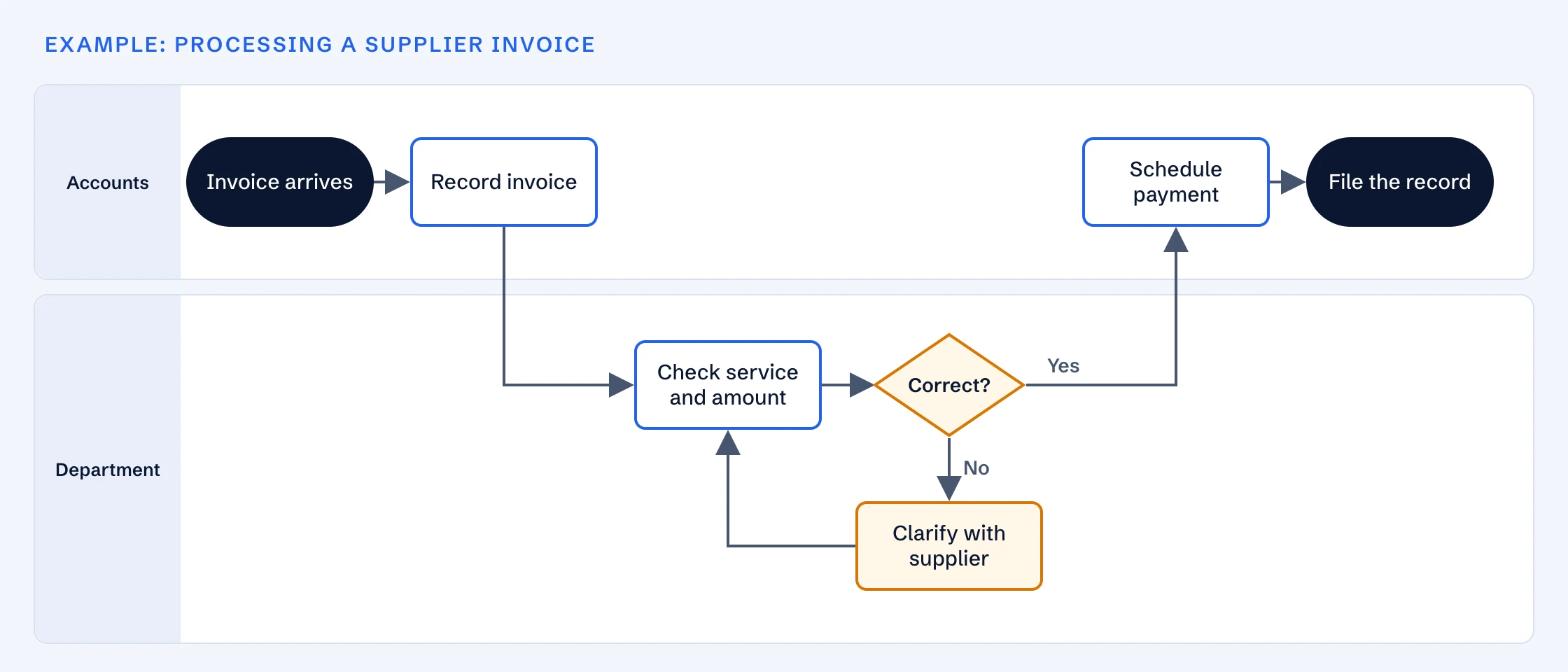
| Steps | 1. Accounts records the invoice. 2. The department checks that the service and amount are right. 3. If not, the department clarifies it with the supplier and checks again. 4. Accounts schedules the payment. 5. Accounts files the record. |
| Exception | The check will take longer than the payment term: the department tells accounts, who ask the supplier for an extension |
| Review | Once a year and whenever the accounting system changes |
Which format fits?
- Text or table: enough for straight workflows with no decisions.
- Flowchart: useful as soon as decisions split the path.
- Swimlane diagram: also shows who does what and makes handoffs between roles visible, which is often where work gets stuck.
- SIPOC: a high level summary of suppliers, inputs, process, outputs and customers. Good as a first rough outline.
- RACI matrix: sets out for each step who is responsible, accountable, consulted and informed.
- BPMN: a standard notation from the Object Management Group. Worth it when workflows will be automated or several teams need a shared language, usually more than a first document needs.
Common mistakes
- Documenting the ideal. Capture what really happens first. You can improve it afterwards, from an honest starting point.
- Writing it from a desk. Without the people doing the work you miss the shortcuts and exceptions that matter.
- Using names instead of roles. The document is out of date at the first staff change.
- Too much detail. Click by click instructions belong in an SOP, linked from the process document.
- No owner. Without an owner and a review date, the document quietly goes stale. Knowledge management explains how this fits into the bigger picture.
Good process documents also help on the way in: they are a solid basis for the 30 60 90 day plan of whoever takes over.
Frequently asked questions
- What is process documentation?
- It is an internal document that describes how a recurring workflow is carried out: trigger, steps, roles, inputs, outputs and exceptions. Its purpose is that people can do the work consistently without relying on one person's memory.
- What is the difference between process documentation and an SOP?
- Process documentation usually shows the whole workflow with its order and roles, often across teams. An SOP gives exact instructions for one procedure. Usage varies between companies, and many link SOPs from the process document for the detail.
- What is the difference between process documentation and process mapping?
- A process map is a visual view of the flow using shapes and arrows. Process documentation is mainly written and adds roles, exceptions, tools and deadlines. The map often forms part of the document.
- How detailed should process documentation be?
- Detailed enough that someone who does not know the process can follow it, and no more. If the document becomes hard to read, split the workflow into sub-processes or move click by click instructions into SOPs.
- Who should write process documentation?
- Ideally the person doing the work, or someone who interviews them. The process owner reviews the result and keeps it current. Documents written without the people doing the work tend to miss the exceptions.
- Do I need software for process documentation?
- No. A word processor and a simple diagram are enough to start. Dedicated software makes sense once you have many documents to approve and maintain, or want to automate workflows. What matters most is that the team can find the document.