
SOP Examples: 8 Standard Operating Procedures by Department

Author: Kevin Baur BSc
Published on
Contents
Most SOPs fail not because of the format but because nobody knows how specific they should be. Examples answer that faster than any theory. The eight SOP examples below come from very different departments on purpose, and they all follow the same structure. Swap in your own systems, roles and deadlines and you have a usable first draft in little time.
One note on the term: SOP here means standard operating procedure, the work document, not a statement of purpose for a university application. If you want a finished document with a header, approval and revision history right away, fill in the free SOP template online and download it as Word or PDF.
What a standard operating procedure is
A standard operating procedure is a set of written instructions for a routine or repetitive activity: what to do, in which order, who is responsible and how you know it was done right. The US EPA guidance on preparing SOPs names the main benefit plainly: SOPs minimize variation and keep quality consistent, even when staff change temporarily or permanently. They also serve as training material and are often used as checklists by auditors.
In most businesses SOPs are voluntary. In regulated industries they are required. US drug manufacturers, for example, must have written procedures for production and process control under 21 CFR 211.100. Even where nobody asks for them, written procedures are what keeps a team working when the one person who knows a process is out sick or leaves.
How every SOP example is structured
All eight examples use the same building blocks. There is no single required format; even the EPA guidance says there is no one correct format. What matters is that every SOP in your company follows the same structure, so people always know where to look.
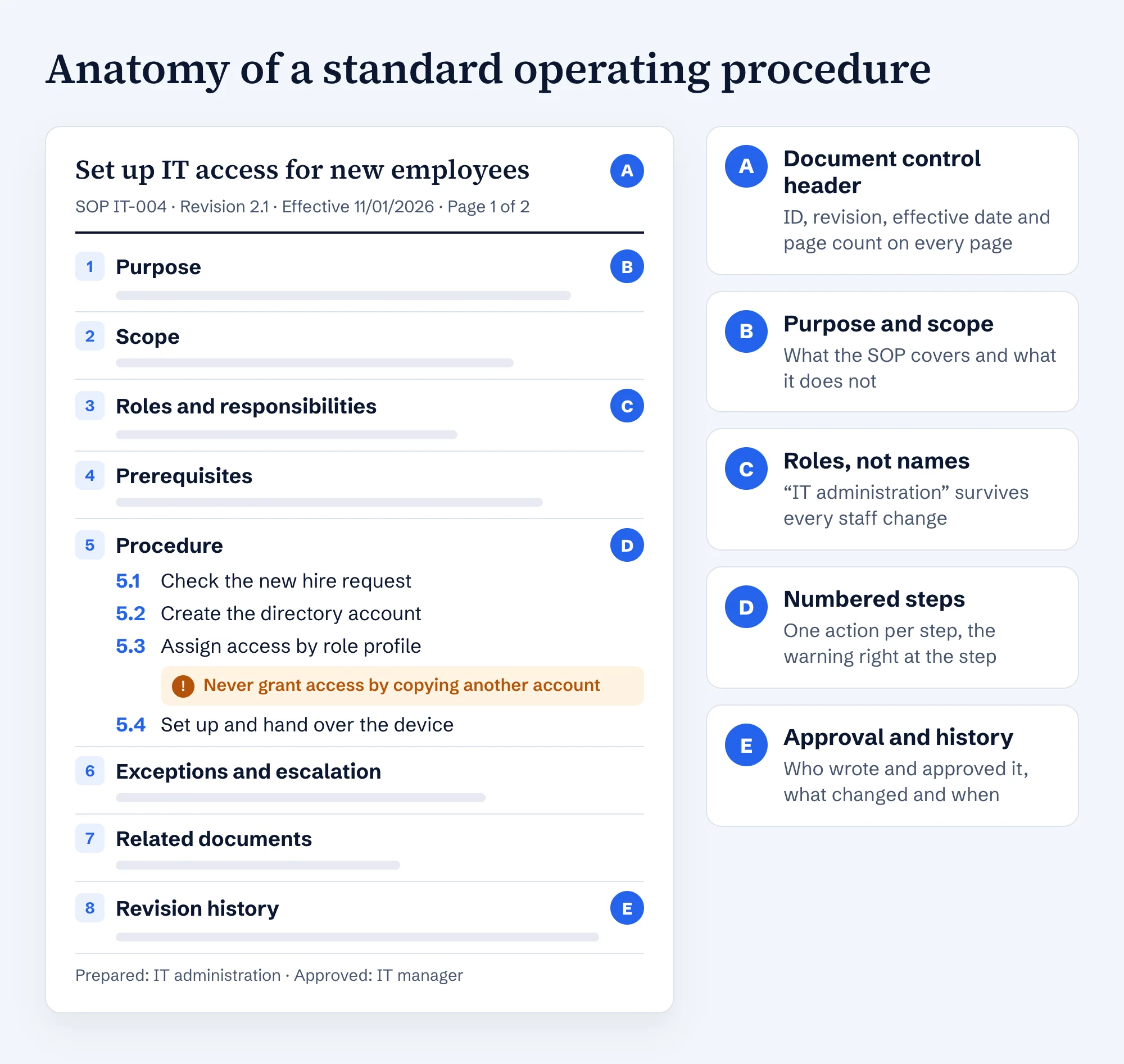
- Header: a title with a verb, document ID, revision, effective date and page count.
- Purpose and scope: what the SOP covers and, just as important, what it does not.
- Roles and responsibilities: roles rather than names, so the SOP survives a staff change.
- Trigger and result: what starts the process and how you know it is finished.
- Procedure: numbered steps with exactly one action each, warnings right at the step they belong to.
- Exceptions, related documents and revision history at the end.
The examples below show the core: purpose, trigger, owner, result, steps and the most important warning. Your finished SOP adds the header, exceptions, related documents and revision history.
8 SOP examples by department
| No. | SOP | Department | Trigger |
|---|---|---|---|
| 1 | Set up IT access for a new employee | IT | New hire notice |
| 2 | Remove access when an employee leaves | IT and HR | Last working day |
| 3 | Bank reconciliation at month end | Accounting | Month end |
| 4 | Handle a customer complaint | Customer service | Complaint received |
| 5 | Receive and book incoming goods | Warehouse | Delivery arrives |
| 6 | Test backups with a restore | IT | Monthly test date |
| 7 | Prepare and approve a sales quote | Sales | Customer request |
| 8 | Shift handover | Operations | End of shift |
All examples are samples. Deadlines, limits and systems are illustrative and need to match your business.
SOP example 1: Set up IT access for a new employee
- Purpose: New employees can work on day one, with exactly the access their role needs.
- Trigger: New hire notice from HR, at least five business days before the start date.
- Owner: IT administration (does the work), hiring manager (defines role and special access), HR (new hire notice).
- Done when: Account active, access documented, device and credentials handed over.
- Check the new hire notice for name, start date, department, role and manager. Ask HR if anything is missing.
- Create the user account in the directory using the company naming convention. Set an expiry date for fixed term contracts.
- Assign access according to the department's role profile. Grant special access only with written approval from the manager.
- Assign the mailbox, licenses and group memberships.
- Set up the device, prepare multi factor sign in and hand over the credentials separately from the device.
- Close the ticket with a list of the access granted and notify the manager.
Warning at step 3: Never grant access by copying a coworker's account. Old special permissions travel along unnoticed.
SOP example 2: Remove access when an employee leaves
- Purpose: After the last day, nobody keeps access to systems, data or buildings, and no ongoing work is lost.
- Trigger: Termination notice from HR. Carried out on the last working day at the agreed time.
- Owner: IT administration (does the work), HR (date and time), manager (who takes over mailbox and files).
- Done when: All accounts disabled, devices returned, return signed off.
- One week before, list every account: directory, license management and cloud services with their own sign in.
- Agree with the manager who takes over the mailbox, files and open work.
- On the last day, at the agreed time, disable every account. Disable, do not delete.
- Deactivate second factor devices, VPN access and the badge.
- Change shared passwords the person knew.
- Collect the devices and have the return signed in the equipment handover form.
- Delete the accounts after the retention period set in your data retention policy.
Warning at step 1: Shared logins such as social media, supplier portals or online banking are in no directory. Ask the person directly while they are still around. The free employee offboarding checklist covers the rest of the departure.
SOP example 3: Bank reconciliation at month end
- Purpose: The balance of every bank account in the books matches the bank statement before the month is closed.
- Trigger: Third business day of the following month.
- Owner: Accounting (does the work), head of accounting (review and sign off).
- Done when: A reconciliation report per account, every difference resolved or marked open with an owner.
- Download the statements of all business accounts as of the last day of the month.
- Compare the balance per bank with the balance of the bank account in the general ledger.
- Sort the differences: bank transactions not yet recorded, and recorded payments the bank has not yet processed.
- Resolve each difference with a supporting document and record it, or mark it open with an owner and a due date.
- File the reconciliation report with both balances and the list of open items.
- The head of accounting reviews the report and signs it off with the date.
Warning at step 4: Never post unexplained differences to a suspense account just to close the month. They come back at year end and are harder to trace by then.
SOP example 4: Handle a customer complaint
- Purpose: Every complaint is acknowledged quickly, decided consistently and analyzed to fix the cause.
- Trigger: A complaint by email, phone or customer portal.
- Owner: Customer service (does the work), customer service lead (decisions above the approval limit), quality (monthly review).
- Done when: Ticket closed with a resolution, customer informed, root cause categorized.
- Log the complaint in the ticket system: customer, order number, product, described defect, photos.
- Acknowledge receipt within one business day, quoting the ticket number.
- Check the order, the delivery and earlier complaints from this customer.
- Choose the resolution from the decision table: replacement, repair or credit. Above the approval limit, the team lead decides.
- Tell the customer the resolution and trigger it.
- Record the root cause in a fixed category and close the ticket.
Warning at step 4: Make no promises about damages or consequential costs without checking with the team lead. Such statements can be legally binding.
SOP example 5: Receive and book incoming goods
- Purpose: Only ordered, complete and undamaged goods are booked and put away.
- Trigger: A delivery arrives.
- Owner: Warehouse (receiving and booking), purchasing (resolving discrepancies).
- Done when: Goods booked and in their storage location, discrepancies documented and reported.
- Match the packing slip against the purchase order in the system: supplier, order number, items.
- Count the packages and inspect them from the outside before signing for the driver.
- Note visible damage and short deliveries on the delivery receipt and have the driver countersign.
- Open the goods and check items and quantities. Photograph any discrepancy and inform purchasing.
- Book the goods receipt in the system.
- Put the goods away in the location the system suggests.
Warning at step 3: Never sign a clean receipt when the packaging is damaged. Damage reported later is much harder to prove.
SOP example 6: Test backups with a restore
- Purpose: Make sure data can actually be restored from backup, not just that the backup job runs.
- Trigger: Monthly, on the first Monday.
- Owner: IT administration (does the work), IT manager (informed, acts on failures).
- Done when: A test log with date, data tested, restore time and result.
- Check last month's backup logs for errors and warnings.
- Pick a random file or folder for the test, and a database every other month.
- Restore it to a test environment or a separate folder.
- Open the content and compare it with the original.
- Write down how long the restore took.
- Record the result in the test log and report any failure to the IT manager right away.
Warning at step 3: Never restore into the original folder. Current files get overwritten with an older version.
SOP example 7: Prepare and approve a sales quote
- Purpose: Quotes are priced correctly, look consistent and contain only approved discounts.
- Trigger: A customer request.
- Owner: Sales operations (prepares the quote), sales manager (approves discounts above the limit), planning (lead times).
- Done when: Quote sent, saved in the CRM, follow up scheduled.
- Log the request in the CRM and link it to the customer.
- Take prices from the current price list and apply the discount from the discount schedule.
- If the discount is above the approval limit, get the sales manager's approval.
- Confirm the lead time with planning.
- Generate the quote from the CRM template and enter the expiry date.
- Send the quote and schedule a follow up.
Warning at step 4: Never promise a delivery date that planning has not confirmed.
SOP example 8: Shift handover
- Purpose: The next shift knows the status, incidents and open items before it takes over.
- Trigger: End of shift.
- Owner: Shift leads of the outgoing and the incoming shift.
- Done when: An entry in the shift log, confirmed by both shift leads.
- Open the shift log 15 minutes before the end of the shift.
- Record the status of running orders.
- Note incidents, the actions taken and their result.
- List open items with an owner and a due time.
- Walk through the handover in person at the workplace, not in the break room.
- Both shift leads confirm the entry with initials and time.
Warning at step 3: Safety incidents must also go into the incident reporting system. The shift log alone is not enough.
Which SOP format fits your process?
Not every process is a straight line. The EPA guidance recommends breaking long text into logical steps and using diagrams or flowcharts where they make a process easier to follow.
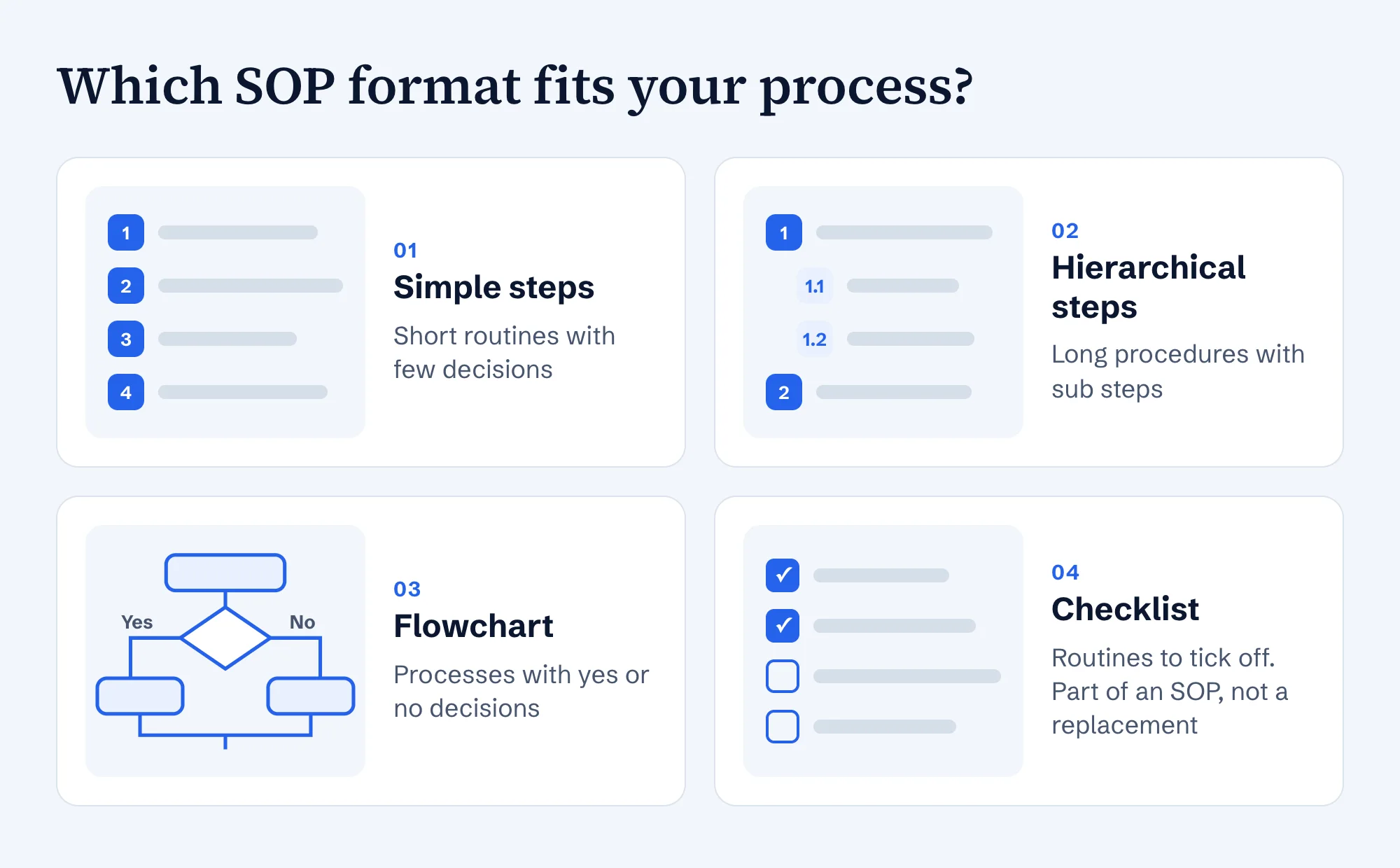
- Simple steps for short routines like the backup test in example 6 or the shift handover in example 8.
- Hierarchical steps (1, 1.1, 1.2) for long procedures with sub steps, such as a month end close across several accounts.
- Flowchart as soon as decisions split the path, like the complaint process in example 4.
- Checklist as an addition for routines people tick off. As the EPA guidance puts it, the checklist is not the SOP but a part of it.
Checklist: is your SOP good enough?
Run every draft through these ten questions before you approve it:
- Does the title describe an activity with a verb, such as “Receive and book incoming goods”?
- Are trigger and result clear, so everyone knows when the process starts and when it is done?
- Do the responsibilities name roles rather than people?
- Does every step contain exactly one action and start with a verb?
- Is every warning placed at the step where the mistake happens?
- Are the most common exceptions covered, with the person who decides?
- Are forms, systems and related SOPs named or linked?
- Does the header show ID, revision, effective date and approval?
- Has someone without experience completed the process alone using only the SOP? That is the bar the EPA guidance sets.
- Is there a review date? The EPA gives every one to two years as an example, and right away when something changes.
How to write your own SOP in six steps
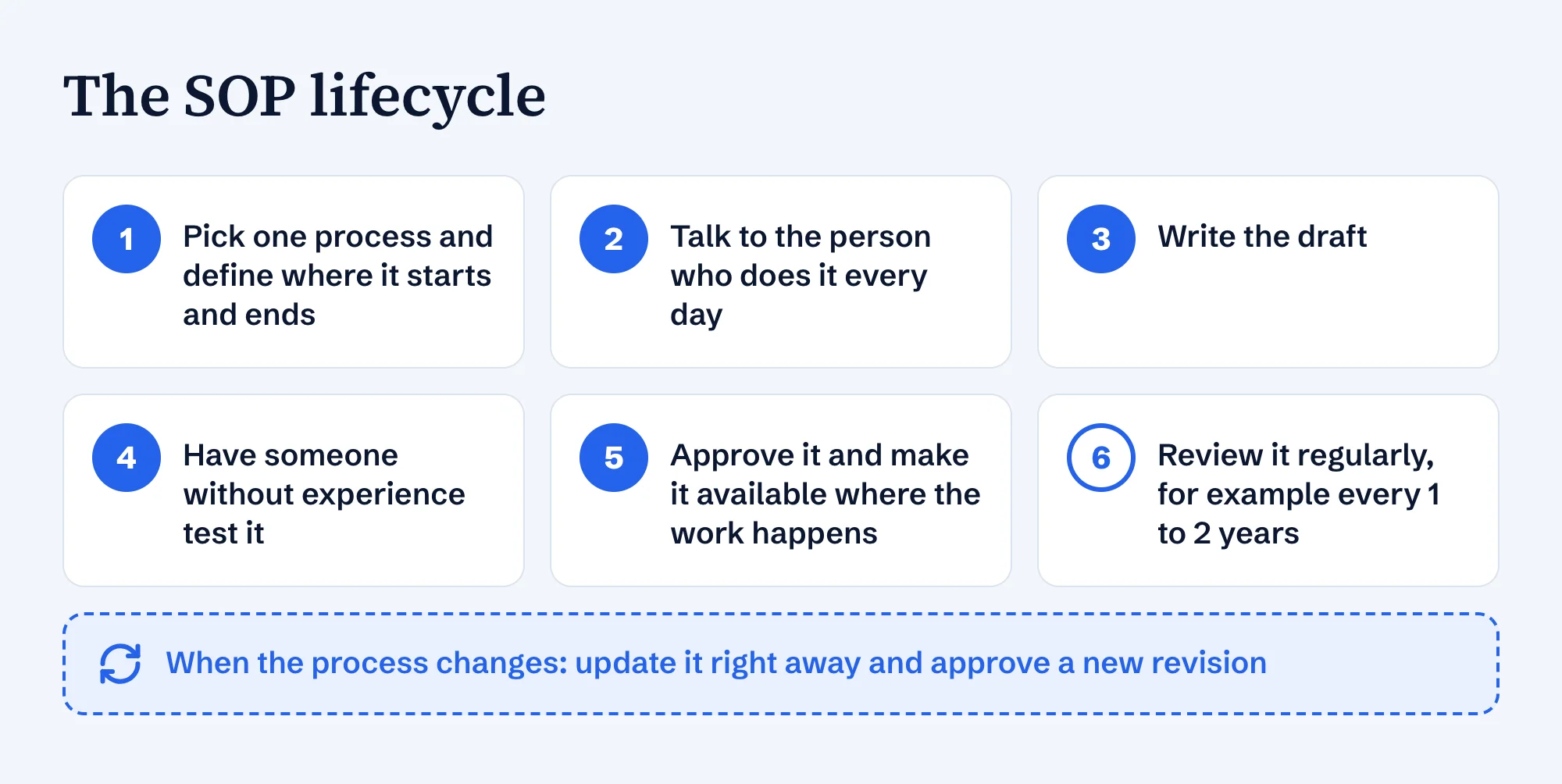
- Pick one process and define where it starts and ends. Start with processes that matter, happen regularly and only one person really knows.
- Talk to the person who does it every day. The EPA guidance recommends that SOPs be written by the people who actually perform the work. Have them walk you through a real case and note every move, including the ones they no longer notice.
- Write the draft using the structure above. The SOP template is the fastest way.
- Have it tested by someone who does not know the process. Every question they ask points to a missing sentence.
- Approve it and make it available where the work happens: on the intranet, in the team folder or printed at the workstation.
- Review it regularly and approve a new revision with every change. Archive older versions so nobody works from an outdated one.
Common SOP mistakes and how to avoid them
| Common mistake | Do this instead |
|---|---|
| A paragraph of prose instead of steps | One action per numbered step, starting with a verb |
| First names as owners | Roles that survive a staff change |
| Only the normal case is described | The most common exceptions, with the person who decides |
| All warnings collected in a section at the end | Each warning right at the step where the mistake happens |
| Several versions in circulation | One approved revision, older versions archived |
| Written at a desk from memory | Written with the person who does the work every day |
Frequently asked questions
- What is an example of an SOP?
- A typical example is “Receive and book incoming goods”: a purpose, a trigger (a delivery arrives), an owner (the warehouse), six numbered steps from matching the packing slip to putting the goods away, a warning about damaged packaging and a clear result. This guide shows eight such SOP examples from different departments.
- What are the main parts of an SOP?
- A header with title, ID, revision and effective date, then purpose, scope, roles and responsibilities, prerequisites, the numbered procedure, exceptions, related documents and a revision history. The SOP template on this site uses exactly these sections.
- How detailed should an SOP be?
- Detailed enough that someone with a basic understanding but little experience can complete the process unsupervised. That is the standard the EPA guidance sets. How deep you go depends on how critical the process is, how often it runs and how many people use the SOP.
- What is the difference between an SOP and a work instruction?
- The terms overlap and many companies use them interchangeably. Where both exist, the SOP usually describes a process across roles, and the work instruction goes one level deeper into a single task at one workstation.
- How often should SOPs be reviewed?
- Give every SOP a fixed review date. The EPA guidance gives every one to two years as an example. When the process, the system or the responsibilities change, update the SOP right away and approve a new revision.
- Can I copy these SOP examples?
- Yes. Replace the systems, roles, deadlines and limits with your own, and have the finished version tested by someone who does not know the process. The free SOP template adds the header, approval and revision history as Word or PDF.